
Setting up Gemini CLI on WSL Ubuntu 24.04
During the past years, I have been under heavy workload of studies and work, and I couldn’t really explore the new AI tools that are coming out these days. Today, I was searching for a pomodoro timer app to help me focus on my work, and I thought, why not building one myself?? I think it was Afshin that had an influence on me. Check out his game (brilliant idea and vibecoded!): Connect 3 Chess.
So, I finally had the motivation and time (at the same time) to explore and experiment with a vibcoding agent. I decided to start with Gemini CLI.
Setting up Gemini CLI on WSL Ubuntu 24.04
I used this guide as a reference.
Step 1: Install Node.js and npm
I used nvm: (see here for more details)
# Download and install nvm:
curl -o- https://raw.githubusercontent.com/nvm-sh/nvm/v0.40.3/install.sh | bash

# in lieu of restarting the shell
\. "$HOME/.nvm/nvm.sh"

# Download and install Node.js:
nvm install 24

# Verify the Node.js version:
node -v # Should print "v24.12.0".

# Verify npm version:
npm -v # Should print "11.6.2".
Step 2: Install and run Gemini CLI
npm install -g @google/gemini-cli
After installation, run the following command to start the Gemini CLI setup. But before that: I believe wherever you run it, it will read the content of that path. So make sure not to run it in some confidential or private path.
$ gemini

 ███            █████████  ██████████ ██████   ██████ █████ ██████   █████ █████
░░░███         ███░░░░░███░░███░░░░░█░░██████ ██████ ░░███ ░░██████ ░░███ ░░███
  ░░░███      ███     ░░░  ░███  █ ░  ░███░█████░███  ░███  ░███░███ ░███  ░███
    ░░░███   ░███          ░██████    ░███░░███ ░███  ░███  ░███░░███░███  ░███
     ███░    ░███    █████ ░███░░█    ░███ ░░░  ░███  ░███  ░███ ░░██████  ░███
   ███░      ░░███  ░░███  ░███ ░   █ ░███      ░███  ░███  ░███  ░░█████  ░███
 ███░         ░░█████████  ██████████ █████     █████ █████ █████  ░░█████ █████
░░░            ░░░░░░░░░  ░░░░░░░░░░ ░░░░░     ░░░░░ ░░░░░ ░░░░░    ░░░░░ ░░░░░

Tips for getting started:
1. Ask questions, edit files, or run commands.
2. Be specific for the best results.
3. Create GEMINI.md files to customize your interactions with Gemini.
4. /help for more information.
After authentication, you can start using Gemini CLI! That’s it!!
Let’s try it out
I gave it a straightforward request.
Create a desktop app for me to for the purpose of setting focused
and DoNotDisturb timers, including breaks, work, etc. I'd like it
to have a small window, with minimal and beautiful colors.
Whenever the timer ends, I want it to make a small bell-like
notification. I want the focused time and break time to be
customizable but also set as default with 3-4 presets. I don't
want the app to stay on top to distract me. Build this app for
running from a WSL Ubuntu terminal that launches a GUI. With Python.
Well, overall, after almost an hour, it did a pretty good job for me, and after asking me to install several dependencies, and fixing several issues, it was able to run the app successfully. However, the soundbell notification did not work due to WSL issue of not being able to access the audio hardware of Windows. Other than that, the app worked fine. Also, I asked for some improvements and features, like repetitions, progress, etc., and it was able to implement them pretty well.
For my record, I had to do the following to make the app work:
sudo apt install python3.12-venv
pyenv virtualenv pomodoro
pyenv activate pomodoro
sudo apt install python3-tk
pip3 install playsound==1.2.2
sudo apt-get install libgirepository1.0-dev libgirepository2.0-dev
sudo apt install libcairo2-dev pkg-config python3-dev
pip install PyGObject
I also install aplay to test sound playing from WSL:
sudo apt install alsa-utils
aplay /path/to/sample.wav
Which didn’t work anyway.
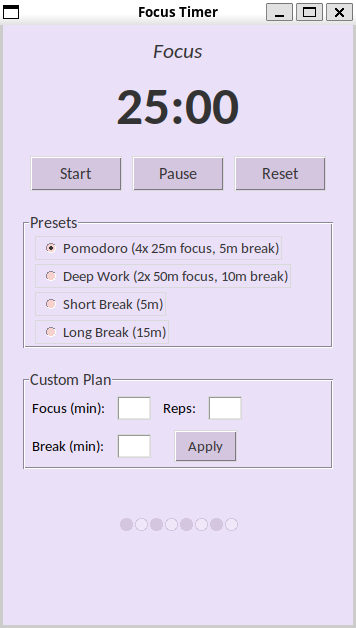
Then, I thought why not running it from Windows, with a clickable icon? So I asked it to generate it, and it did a great job again. It created a .bat and a .vbs file to launch the app without a terminal window. I also updated the color scheme a bit to match my Windows dark/green theme.
Here is how the app looks:
The code generated by Gemini CLI can be found here.
See this summary of the session:
> /quit
╭─────────────────────────────────────────────────────────────────────────────────╮
│                                                                                 │
│  Agent powering down. Goodbye!                                                  │
│                                                                                 │
│  Interaction Summary                                                            │
│  Session ID:                 erased                                             │
│  Tool Calls:                 9 ( ✓ 8 x 1 )                                      │
│  Success Rate:               88.9%                                              │
│  User Agreement:             88.9% (9 reviewed)                                 │
│  Code Changes:               +936 -50                                           │
│                                                                                 │
│  Performance                                                                    │
│  Wall Time:                  9h 58m 3s                                          │
│  Agent Active:               8m 21s                                             │
│    » API Time:               5m 41s (68.2%)                                     │
│    » Tool Time:              2m 39s (31.8%)                                     │
│                                                                                 │
│                                                                                 │
│  Model Usage                 Reqs   Input Tokens   Cache Reads  Output Tokens   │
│  ────────────────────────────────────────────────────────────────────────────   │
│  gemini-2.5-flash-lite         16         58,787             0          1,734   │
│  gemini-2.5-pro                22        192,728       211,514         19,758   │
│  gemini-2.5-flash               3         37,601        11,406            562   │
│                                                                                 │
│  Savings Highlight: 222,920 (43.5%) of input tokens were served from the cache, │
│  reducing costs.                                                                │
╰─────────────────────────────────────────────────────────────────────────────────╯
Well, that’s it for now. I am very much excited to do more exciting things with these agents! Let’s see how it goes.